
Odoo Online (SaaS)
Hosted and maintained by Odoo. Quickest to launch, with standard apps only. Your trial starts here.
Services · Open-source business suite
Odoo v20 puts CRM, sales, accounting, inventory, manufacturing, eCommerce and HR in a single database, and now adds built-in AI agents. Try it at no cost, then let our team set it up so your people actually use it.
Stats: odoo.com home page and editions page, October 2026.

Odoo is a suite of open-source business apps (CRM, eCommerce, accounting, inventory, point of sale, project management and more) that share one database. Odoo 20 is the latest major release, with release notes dated September 2026. It comes in two editions: free, open-source Community and licensed Enterprise.
Sources: Odoo 20 release notes · Odoo editions
Most SMBs run on a patchwork: a CRM here, QuickBooks there, inventory in spreadsheets, a separate store and email tool. Each app bills per seat, nothing shares data, and staff retype the same information all day. Nobody has one trustworthy view of the business, so month-end and planning turn into reconciliation exercises.
Odoo replaces the patchwork with one integrated platform: every app writes to the same database, so a sale updates stock, accounting and the customer record at once. You start with the apps you need and add more as you grow, on open-source foundations, with an implementation partner to set it up properly.
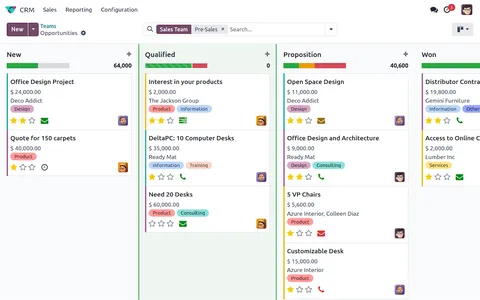
Each Odoo app covers one business function and shares data with all the others. Below are the core apps most SMBs start with, what each does, and one verified change from the official Odoo 20 release notes, so you can see exactly what’s new in v20 compared with v19.
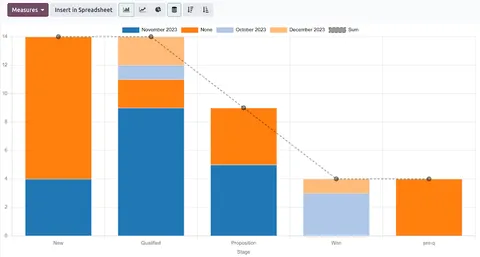
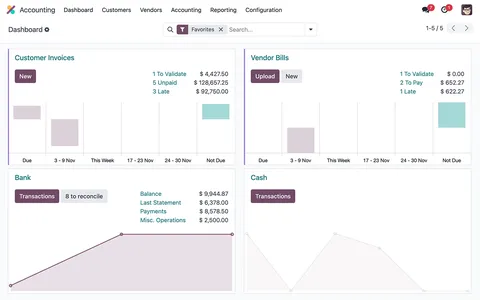
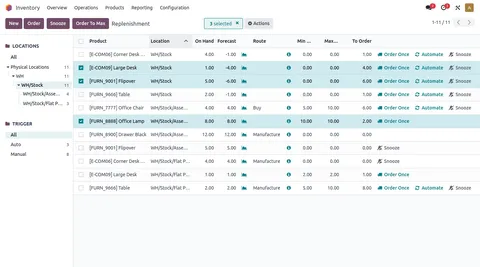
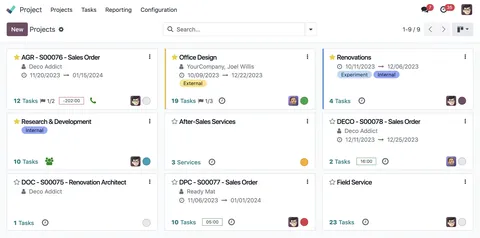
Every item comes from the official Odoo 20 release notes. App pages: CRM · Accounting · Inventory · Project
Odoo 20 makes AI agents part of everyday work. Agents can create and update records, answer questions about files, generate images for websites and mailings, and run from automated or scheduled actions. Accounting gets AI financial insights, and eCommerce gets AI product editing. Per the release notes, all AI features now need IAP credits.
Deep dive: Odoo 20 AI that does the work, not just the talking · Official Odoo AI documentation
The Odoo MCP server lets an external AI agent work directly with your Odoo database. Model Context Protocol (MCP) is an open standard. You create an API key with the MCP scope, configure an MCP-compatible client such as Claude Code, Antigravity or Codex, and expose the tools you choose. The agent then reads or updates data with your permissions.
Sources: Odoo AI MCP server docs · Available MCP tools · Release notes: “Connect to your database via MCP”
Odoo serves almost any SMB that sells, makes, stocks or services something. Odoo publishes ready-made industry packages for retail, food and hospitality, real estate, consulting, manufacturing, health and fitness, trades and nonprofits, and v20 adds new packages such as Catering, Community Care, Electronic Refurbishment and Custom Industrial Equipment.
A typical SMB stack pairs HubSpot for CRM, QuickBooks for accounting and Shopify for the store, joined by connectors. Odoo covers all three, plus inventory, manufacturing and HR, in one database. The trade-off: Odoo needs a proper implementation, while point tools are quicker to start with but cost more to keep in sync.
| Area | Odoo v20 | HubSpot + QuickBooks + Shopify |
|---|---|---|
| Data | One shared database | Three databases plus sync connectors |
| CRM & sales | CRM, Sales, Subscriptions | HubSpot |
| Accounting | Accounting, Invoicing | QuickBooks |
| Store & POS | eCommerce, Website, Point of Sale | Shopify |
| Inventory & manufacturing | Inventory, Barcode, MRP, PLM, Quality | Add-on apps needed |
| HR & projects | Employees, Payroll, Project, Helpdesk | More separate tools |
| AI & agents | Built-in AI agents and MCP server | Varies per vendor |
| Source code | Open-source Community core | Proprietary |
More: Odoo CRM vs HubSpot: the honest math · NetSuite to Odoo: the honest math
Community is Odoo’s free, open-source edition. You host and maintain it yourself, and it includes the core apps. Enterprise is the licensed edition, built on top of Community, and adds more apps (Studio, for example), functional support, version upgrades and hosting. Odoo says you can switch editions at any time.
Check the official app-by-app editions comparison. If a partner pitches you Community just to make the quote look cheaper, ask who pays for the workarounds.
Odoo runs three ways. Odoo Online is Odoo’s managed SaaS and the fastest start, but it doesn’t support non-standard (custom) apps. Odoo.sh is Odoo’s cloud platform for projects that need custom modules. On-premise means you self-host. Odoo documents how to move a database between all three, so you can change course later.
Hosted and maintained by Odoo. Quickest to launch, with standard apps only. Your trial starts here.
Odoo’s cloud platform for custom modules, with Git-based development and staging environments. Best when you need customization without running servers.
Run Community or Enterprise on your own servers or your own cloud. Full control, but hosting, backups and upgrades are on you or your partner.
Start on Online, then move to Odoo.sh or on-premise when you need custom apps. Odoo documents transfers in each direction; Online intermediary versions must first upgrade to the next major version.
Source: Odoo hosting documentation · Odoo editions
Start with a free trial, then implement in phases. Explore Odoo with your own processes in mind, book a fit call, lock the scope, migrate clean data, train each role, and go live with financials and operations first. Everything else follows in waves, so value starts flowing before the whole project is finished.
Because software is the easy part. David Strausser is Head of Sales at Quaint Business Solutions, a boutique ERP firm for US SMBs that implements Odoo and SAP Business One. We work configuration-first, phase delivery and stay through go-live, and we’ll tell you if Odoo isn’t the right fit.
“David is the definition of a ‘go getter.’ He has vast business knowledge for international business, technology and manufacturing.”
See it in the field: Inspiralia runs Odoo · Purish runs Odoo · About Quaint Business Solutions
Odoo 20 (release notes dated September 2026) adds agentic AI that can create and update records, an MCP server so external AI agents can work with your database, offline mode, simplified access rights, multi-record drag and drop, payment-based sales commissions, and new industry packages. Odoo's official release notes list every change.
Odoo Community is open source and free to download; you host and maintain it yourself. Odoo Enterprise is the licensed edition, built on Community, and adds more apps plus official support, version upgrades and hosting. Odoo says you can switch editions at any time. AI features in v20 use paid IAP credits.
It is an Odoo AI feature that lets an external MCP-compatible AI agent, such as Claude Code or Codex, connect to your Odoo database with a scoped API key. The agent can then search, group, create and update records, and open views, using only the tools and permissions your database exposes.
Start through our partner Quaint Business Solutions at quaintbusiness.com/tryodoo. You get a trial database to explore the apps with your own processes in mind. When you are ready, Quaint and Dead Brands scope the implementation, migrate your data, train your team and support go-live.
It depends on scope, but a focused SMB implementation usually runs in months, not weeks. The things that drag timelines out are fuzzy scope, dirty data and endless customization requests. We lock scope early, go live with financials and operations first, and phase in the rest.
Community fits technical teams that can self-host and need core apps. Enterprise fits most growing businesses: it adds apps such as Studio, plus support, upgrades and hosting. We recommend an edition only after mapping your processes, and Odoo's official editions page has the app-by-app comparison.
Keep reading: Odoo 20: what’s actually new · Day-one apps for a 20-person company · Odoo automation mistakes
Try Odoo free, then talk to people who implement it for a living.
Odoo and the Odoo logo are trademarks of Odoo S.A. Product images © Odoo S.A., from odoo.com. Dead Brands, LLC works with Quaint Business Solutions, an Odoo implementation partner.