
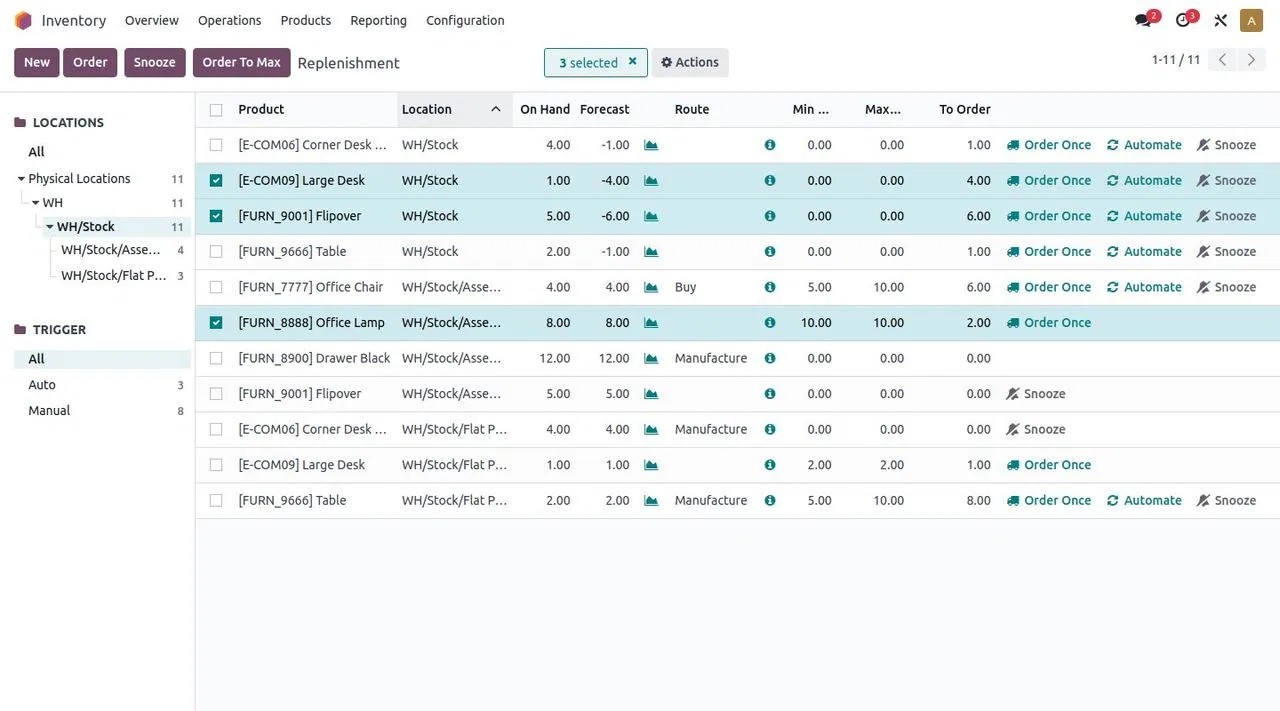
What a replenishment rule actually watches
In Odoo, a reordering rule keeps a product’s forecasted stock above a minimum threshold without replenishing beyond a set maximum. You configure the product, the stock location, and the minimum and maximum quantities. When forecasted stock drops below the minimum, the rule is ready to trigger.
That forecast is the key detail. A shelf count tells you what is on hand now. Forecasted stock helps show what will be available after expected stock movements. An item might have 18 units on the shelf, for example, but if confirmed demand will take 15 and only 2 are expected in, the forecast is 5 — not 18.
So the question is not simply, “How many do we have?” It is, “How many are we likely to have when the next demand and receipts land?”
The forecast gives the buyer more context than a quick glance at the shelf.

Min and max: the reorder signal and the target
Think of the minimum as the point where the system raises its hand. Think of the maximum as the quantity the rule aims to restore.
Suppose a distributor sets a minimum of 12 units and a maximum of 48. If forecasted stock falls below 12, Odoo calculates replenishment toward the maximum. The quantity to order can depend on the forecast, planned movements, and product settings, so the final proposed amount is not always a simple “max minus what’s on hand.”
The numbers should represent how your business works, not a guess copied across every item.
When setting them, consider:
- Normal demand: How quickly does the item move during a typical week or month?
- Supplier lead time: How long does it take to receive the item after ordering?
- Demand swings: Does the product spike during certain seasons, promotions, or customer projects?
- Buying constraints: Does the supplier sell in cases, packs, or minimum order quantities?
- Storage and cash: How much stock can you reasonably hold without tying up space and working capital?
As a starting point, imagine an item that usually takes two weeks to arrive and sells about eight units a week. Your team might set the minimum to cover expected demand during that lead time, plus an appropriate buffer. Then set the maximum to a level that fits your buying rhythm and storage capacity. Those values should be tested against real demand and adjusted as the business learns.
A rule is only as smart as the assumptions behind it.
Auto or Manual: choose who makes the next move
Odoo offers two trigger choices, and both use the min/max logic. The difference is what happens when replenishment is needed.
Auto trigger
With an Auto trigger, Odoo creates a replenishment document when forecasted stock falls below the minimum. Depending on the selected route, that can be a request for quotation for a purchased item or a manufacturing order for an item you make.
That does not mean every company should remove human review from purchasing. The replenishment document gives the team a head start; your approval and purchasing process still matter. Make sure the right route, supplier, and responsibilities are in place before relying on automatic replenishment.
Manual trigger
With a Manual trigger, Odoo lists the item on the Replenishment dashboard when it needs attention. A buyer can review the forecast, lead times, deadlines, and suggested quantity, then choose to order.
Manual rules can be a good fit when demand is lumpy, supply is unpredictable, or the buyer needs to consider context that a rule cannot capture. The system spots the signal. The person still makes the call.
For both options, the forecast threshold matters. Odoo’s documentation notes that automatic rules can be triggered when the scheduler runs, or when confirming a sales order pushes forecasted stock below the minimum. The scheduler runs once a day by default. Check the current Odoo replenishment rule documentation for the configuration details that match your version.
Set up the rule with the floor in mind
Before creating rules in bulk, test one product that your team knows well. Confirm its product settings and inventory behavior first.
- Make sure Odoo tracks the item. The product needs to be configured as goods with inventory tracking enabled.
- Choose the right replenishment route. If you buy it, confirm purchasing is set up and the appropriate supplier information is available. If you make it, confirm the manufacturing setup is in place.
- Select the location. A rule for the wrong warehouse or stock location can create a technically correct answer to the wrong operational question.
- Set Min and Max deliberately. Start with a product where demand, lead time, and ordering habits are familiar.
- Choose Auto or Manual. Decide whether the rule should create a replenishment document or put the need in front of a buyer.
- Test the result. Review the replenishment suggestion against a real scenario before rolling the setup out to more products.
Then watch what happens during a normal buying cycle. Are the suggestions arriving early enough? Are order quantities practical? Are buyers seeing the information they need? Update the rules when the evidence says they need attention.
The goal is fewer surprises at the shelf, not less judgment on the warehouse floor.
Start with the items that matter most
A warehouse can carry thousands of products. That does not mean you need to design every rule at once.
Begin with the fast movers, items with long or unreliable lead times, and products that regularly cause a missed shipment when they run short. Those are the places where an early signal can make a practical difference.
Then set a review rhythm. Ask buyers and warehouse staff what the replenishment dashboard gets right and where the recommendations miss the mark. A surprising quantity may point to a wrong minimum, stale supplier data, a location issue, or a recent demand change. Treat it as a useful prompt to investigate, not simply a number to override.
Odoo’s Inventory app overview and the reordering rules guide provide further detail on product setup, routes, and replenishment behavior.
The win is not that a system replaces the buyer who knows the business. The win is that their knowledge becomes a repeatable starting point the whole team can work from, and improve together.
Let the rule catch the signal. Let your people bring the judgment.
Frequently Asked Questions
Does Odoo reorder based on the quantity physically on hand?
The rule uses forecasted stock to decide whether the minimum has been crossed. On-hand quantity is important, but planned stock movements can affect the forecast.
Does Auto mean Odoo sends an order to the supplier without review?
Auto creates a replenishment document based on the product’s configured route. Your purchasing approvals and process should determine how that document is reviewed and confirmed.
When should we use a Manual trigger?
Manual can suit products where a buyer wants to review current needs, lead times, deadlines, or other business context before ordering. The item appears on the replenishment dashboard for review.
Should every product have the same minimum and maximum?
No. Product demand, supplier lead time, order quantities, storage limits, and business priorities vary. Set rules to fit the item and review them when conditions change.