When the recipe lives in one person’s head
Every shop has someone who knows the little things that keep a build moving.
They know which bracket needs the longer bolt. They remember that a particular customer’s version uses a different cable. They know to stage one part before the next operation, even though the work order doesn’t say so.
That experience is valuable. But when the knowledge exists only in someone’s head, it’s hard to repeat reliably across shifts, locations, or new hires. A production run can slow down while someone tracks down the expert, or move forward based on a half-remembered answer.
A BoM gives that know-how a working home. In Odoo, a bill of materials lists the components and quantities required to produce a product. Depending on how your process is set up, it can also include operations and step-by-step instructions. Odoo’s BoM documentation describes the BoM as a blueprint for manufactured products and kits.
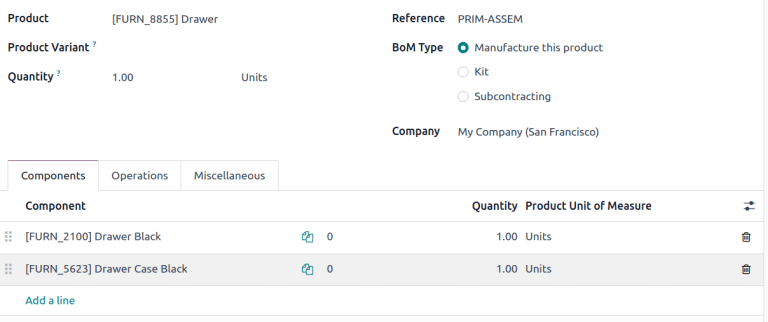
In Odoo, a BoM brings a product and its required components into one place.
What goes into a useful BoM?
Start with the build as it actually happens. A useful BoM should be specific enough to guide the work, without turning into a document nobody wants to maintain.
For each product, define:
- The output: Which product does this BoM produce, and how many units does one BoM represent?
- The components: What parts, materials, or subassemblies go into it?
- The quantities: How many of each component are required for the listed output?
- The variants: Does a component or operation apply only to a particular version of the product?
- The work: Which operations need to happen, and at which work center?
- The instructions: What must the operator know, check, or record while doing the work?
Odoo lets you set the BoM quantity, add component lines, and optionally specify which product variants use a component. With work orders enabled, you can also add operations and associate them with work centers. The right level of detail depends on the work: record what helps the team build consistently, not every informal habit that can be explained more clearly on the floor.
A good starting point is one product that causes repeat questions. Work with the people who build it, agree on the approved recipe, and enter that recipe where the production team can use it.
The recipe also affects material planning
A BoM is not just an assembly note. Its components and quantities can inform what production needs to have on hand.
Suppose a product requires four legs, a tabletop, and a set of fasteners. If the quantity or component list is wrong, the system’s view of what a production run needs will be wrong too. The same detail matters when a finished product includes multiple subassemblies: the recipe should reflect what each stage requires.
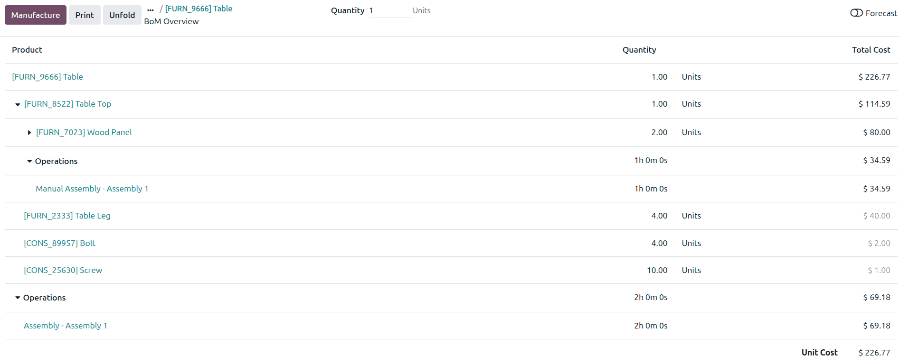
Odoo’s BoM Overview can show the components and operations involved in making a product. Depending on the setup, the overview can also help teams examine quantities, costs, availability, and lead times. This gives planners a place to investigate whether an order is ready to move forward, or which missing component needs attention.
An overview can help teams follow a build from the finished product down to its components.
The system can only help if the underlying recipe is trustworthy. If the shop changes a component but leaves the BoM untouched, the gap can show up as a shortage, a substitution nobody recorded, or a cost that doesn’t match what the team used.
Estimated cost and actual cost tell different stories
A BoM can also provide a basis for estimating what a manufacturing order should cost. Odoo’s manufacturing cost calculations can take component costs and quantities into account, along with operations and work center costs when those are configured.
But an estimate is not the same as a record of what happened. Actual production may use more material than planned. An operation may take longer. A component’s purchase cost may change. Those differences are worth seeing rather than burying.
In Odoo, a manufacturing order can show an estimated cost and a real cost. The estimated figure is based on the BoM configuration; the real cost can reflect actual component use and recorded operation time. That distinction helps a team ask better questions: Did the recipe need updating? Did the job need rework? Did a supplier price move?
Cost visibility starts with a clear recipe and improves when actual production data is recorded.
For more detail on how the figures are calculated, see Odoo’s manufacturing order costs documentation. It explains how component, operation, work center, and employee costs can factor into estimated and real manufacturing costs.
Keep revisions from becoming shop-floor surprises
Products change. A supplier changes a part. Engineering approves a new design. The team finds a better way to assemble a product. The important thing is making sure the people building the next order know which recipe is approved.
For teams that use Odoo’s Product Lifecycle Management (PLM) features, engineering change orders can help manage BoM revisions. A change can be reviewed and recorded before it becomes the production version. Odoo’s version control documentation describes how PLM can preserve prior BoM details and show revision history.
Not every shop needs the same change-control process. But every shop benefits from knowing who owns the recipe and how updates reach the floor.
A practical first pass
If your team is ready to move one build out of someone’s head and into a shared process, keep the first pass simple:
- Choose a product with repeat questions, material substitutions, or frequent shortages.
- Ask the people who build it to walk through the approved process.
- Record the output quantity, components, quantities, and any relevant variants.
- Add operations and instructions where they genuinely help the work.
- Review the result with the shop-floor team before relying on it.
- Assign someone to keep the BoM current as the product changes.
Then check the recipe against a real production run. Did the team use the listed components? Were the quantities right? Did the process reveal a missing step? Those answers help turn a first draft into a working standard.
A BoM won’t replace the judgment of an experienced operator. It helps make that experience available to more of the team, on the shift when it’s needed.
The best recipe is the one your people trust enough to use, and remember to update.
Frequently Asked Questions
What is a BoM in Odoo Manufacturing?
A bill of materials lists the components and quantities needed to produce a product. It can also include operations and production instructions, depending on how the manufacturing process is configured.
Can an Odoo BoM include different product variants?
Yes. A BoM can apply to a product variant, and component lines can be set to apply to specific variants. This helps distinguish what changes between versions of a product.
Does a BoM show the exact cost of every production run?
A BoM can provide the basis for an estimated manufacturing cost. The actual cost can differ when component usage, production time, or other costs differ from the estimate.
How should a manufacturer keep BoMs current?
Assign ownership, review the recipe with the people who build the product, and update it when approved product or process changes occur. Teams using Odoo PLM can use engineering change orders to manage and record revisions.