What's actually in Odoo 20
Accounting: the guardrails get serious
Accounting is where v20 quietly does its best work. Most of these features will never make a keynote slide, and every single one of them prevents a kind of mistake I've watched cost a small business real money.
Pay your vendor bills straight from Odoo. The big one first: PISP (payment initiation) support means you can initiate bill payments directly from inside Odoo instead of keying them into your bank portal and hoping the amounts match. Fewer re-keying errors, fewer "I paid the wrong invoice" mornings.
The bank account consistency check. Journal entries that hit bank accounts must now originate from actual bank transactions, no more manual journal entries posted straight to a bank account that don't match anything real. Statement validation feedback got sharper too, so balance inconsistencies surface fast. This is the kind of boring control that stops both fraud and fat-finger errors cold, and it's the feature your controller will thank you for six months from now without remembering why.
A bank reconciliation summary report. Reconciliation has always been where Odoo's accounting felt like it was built by developers rather than accountants. A proper summary report of the reconciliation state, what matched, what didn't, what's outstanding, is the difference between a 20-minute month-end review and a two-hour archaeology dig.
!Odoo 20's bank matching view, where statement lines meet their journal entries
Cash journals get tamper-evident hashing. If your business handles cash, this matters: journal entries in cash journals are hashed upon reconciliation, so you can prove nobody edited history after the fact. That's an audit feature, and auditors notice.
Double-payment prevention and clearer payment statuses. Odoo got better at stopping you from paying the same bill twice, and payment statuses were renamed to say what they actually mean. Both sound trivial. Neither is, when you've got an AP clerk processing 200 bills a week.
Parent accounts replace account groups. The old account-group structure for the chart of accounts is gone, replaced by parent accounts, and account codes are now optional. If your chart of accounts has sprawled over the years (whose hasn't), this is how you get a P&L that reads like English again without renumbering everything.
Access rights without the record-rule spaghetti. This one's under the hood but it matters for anyone who's ever paid a consultant to untangle Odoo permissions: record rules are gone, replaced by domains set directly at the access-right level. Simpler to understand, simpler to audit, fewer weird "why can she see that?" tickets.
Valuation without the Inventory app, withholding breakdowns. Smaller companies can now run inventory valuation without installing the full Inventory app, and withholding tax reporting breaks down properly where it applies. Both lower the barrier for the 10-person company that needs real accounting but not a warehouse module.
The honest summary: v20's accounting didn't get flashier, it got safer. That's worth more than any AI demo.
Payroll: it finally acts like payroll software
Odoo's Payroll app has always felt like the promising junior on the team. In v20 it got promoted.
A dashboard that leads with warnings. The payroll dashboard now surfaces problems first, missing data, employees with issues, things that will blow up the pay run, instead of making you hunt for them. Payroll is the one module where "surprise" is never good news.
Step-by-step pay runs with a test print. Pay runs are now guided, and you can do a one-click test print before anything is final. If you've ever had the cold-sweat moment of realizing a pay run posted wrong, you know exactly why this exists.
Net-to-gross salary simulation. Offer a candidate $X net and see what it costs you gross, right in the system. Recruiting and HR will use this weekly.
Send payslips when it makes sense, not when the run finishes. Payslip delivery timing is now controllable instead of tied to pay-run completion. Small thing, real professionalism upgrade.
The Planning-Payroll work-entries link is gone, and time-off types got merged. Odoo removed the automatic work-entries bridge between Planning and Payroll and consolidated the time-off types. Translation: fewer invisible dependencies between apps, which means fewer "why did my payslip change?" mysteries. I consider this a cleanup win, not a loss.
Day-hours working schedules. Schedules can now be defined in day-hours, which sounds minor until you're running shifts that don't fit the standard full-time template.
If you're running payroll in Odoo today, v20 is the first version where I'd stop apologizing for the module.
Planning absorbs Field Service: one app instead of two
This is the headline structural change in v20, and it's the right call: the Field Service app is discontinued, and its features now live in Planning. If you run a service business, here's what that actually gives you:
Travel fees you can invoice. Distance-based travel fees or fixed travel-time fees, billed to the customer. Service companies have been hacking this together with manual lines forever; now it's native.
Customer equipment tracking tied to maintenance contracts. You can see whether a customer's equipment is covered by a maintenance contract (via Subscriptions) and pull up the equipment documentation right from the shift. The tech shows up knowing what's under contract and what the last visit found. That's the difference between a professional service visit and an expensive guess.
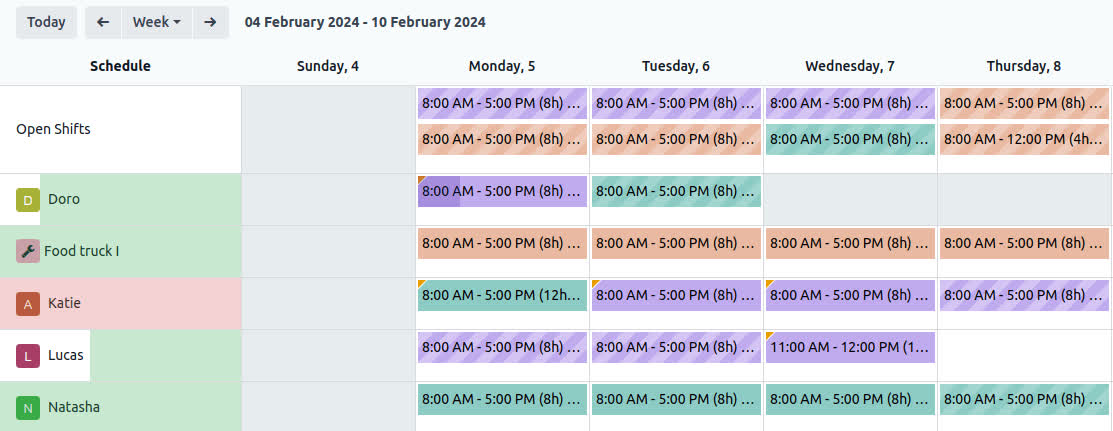
A live map of your technicians. Track where your techs are on a live map, see shift locations against technician availability in the map view, and choose between ordered routing (respect the stop sequence) and optimized routing (shortest path). Connect Mapbox and travel times show up in the Gantt view so scheduling accounts for drive time. This is dispatch software now, not just a calendar with names on it.
Auto-plan that respects customer locations and shift priorities. The auto-planning feature now factors in where customers actually are, and you can set shift priorities so the urgent jobs get scheduled first. Combined with drag-and-drop scheduling from the side panel, this is the closest Odoo has come to real dispatch automation.
Send shifts to techs over WhatsApp. Schedules go straight to employees' phones via WhatsApp. Your techs are already there; meeting them there beats another app they'll never open.
Shifts linked to project tasks. A shift can now be tied to a specific task, so field work flows into project tracking instead of living in a separate universe.
The migration note that matters: if you're on Field Service today, start planning the move. The app is discontinued, which means no more updates, and the Planning-based workflow is where all future development goes. Test it on a copy of your database first, especially if you customized worksheets (they now use property fields instead of Studio fields).
POS: the retail workhorse levels up
Point of Sale got one of the longest feature lists in v20, and most of it is stuff retailers actually asked for:
Multi-currency checkout in the same POS. Tourist areas, border towns, anywhere customers pay in more than one currency, you can now accept multiple currencies at checkout without workarounds.
Self-ordering that acts like it. Customers scan an order-specific QR code, order from their phone, pay after the meal, leave notes that show on the kitchen display, and get their receipt via WhatsApp or SMS. Optional products show on mobile and kiosk. This is a complete self-service loop, not a demo feature.
Snooze products. 86 the salmon in one tap and it's gone from the POS and the self-ordering menu until you bring it back. Anyone who's worked a restaurant floor knows why this is on the list.
End-of-session accounting that makes sense. Closing a session now generates a single global sale instead of a pile of miscellaneous entries, which means your accountant stops asking what all those lines were.
Combo suggestions. The POS recommends converting order lines into combos when it makes the order simpler. Faster for big tables, fewer errors.
Printer management for real restaurants. Multiple printers per POS, choose which printer gets what, preparation tickets split per product. If you've got a kitchen, a bar, and a patio, this is your feature.
Service fees, Mercado Pago, and UPI QR payments. Add service fees via presets (shown on invoices), take Mercado Pago terminal QR payments (now including Chile), and accept static UPI QR payments. The payment coverage keeps getting more international, which matters if you sell across borders.
A "Supervised" access level. A new highly restrictive employee access tier for POS. Hand the register to the new hire without handing them the keys to the kingdom.
Simplified inventory without the Inventory app. Like eCommerce, POS can now run on a simple on-hand quantity per product with no required transfers. And for the Inventory app itself, reordering rules now suggest min/max levels based on demand history, coverage days, and order frequency:
!Odoo 20's replenishment dashboard with min/max levels and one-click ordering
That's the system doing the math your purchasing person does in a spreadsheet today.
Odoo Phone: a real phone system now
Odoo's phone app has been quietly improving for years, and v20 is the version where I'd spec it for a client without caveats:
A call flow designer. Build real incoming-call flows with extensions, call menus, and time- and location-specific steps. That's PBX functionality, inside your ERP, tied to your contacts.
Auto-fill and auto-logging softphone. Calls log themselves against the right records, and the softphone pulls up who you're talking to. The floating, draggable widget means it stays out of the way until you need it.
Multiple numbers, your choice of caller ID. Assign several numbers to a user and let them pick which one shows on outbound calls. Sales teams with local presence numbers, this is for you.
Move calls between devices mid-call. Start on your desk, walk to your car, keep talking. Plus simultaneous calling (start or take a second call while on one), push notifications for incoming calls, and QR-code provisioning for Linphone.
If you're paying for a separate phone system that doesn't talk to your ERP, run the math on this one.
WhatsApp: from notification channel to workflow
WhatsApp in Odoo v20 stops being a place you send receipts and becomes a place you run processes:
Interactive message templates. Templates with buttons and named parameters, plus default recipients, so messages go to the right person with the right data filled in. Simplified authentication to get it all connected.
Abandoned cart follow-up. Your eCommerce store can now nudge customers over WhatsApp when they bail on a cart. If you sell online, you know the stats on cart recovery; this is the highest-ROI message you'll ever send.
Shift schedules and self-order receipts. As covered above: techs get their shifts on WhatsApp, restaurant customers get their receipts there. The pattern is consistent, Odoo is meeting people where they already are instead of asking them to open another app.
The Light User tier: the seat math changes
This deserves its own section because it changes the pricing conversation for every Odoo quote I've ever written.
What it is: a new, cheaper user tier for employees who only need HR self-service and the specific apps their job requires. Odoo's own definition: any active user account designated as a "Light User," or any active employee record not linked to a full user account. Think: the warehouse worker who scans barcodes all day, the tech who checks their schedule and files worksheets, the retail associate who requests time off and runs the register. They don't need Studio, the external API, advanced configuration, or database management, and now they don't pay for full-seat pricing either.
What they can do: Odoo publishes the exact capability list. As users: My Time Off, My Expenses, My Appraisals, My Attendances, My Referrals, My Planning, Field Services, Inventory Barcode Operator, and read-only Knowledge. As employees: get payslips, use the Point of Sale, and use the Manufacturing shop floor. The v20 release notes give the concrete example: restrict a light user's access to just the Barcode module. The essentials work; the admin toys don't.
What it costs: US$8.90 per user per month on the US pricelist, a fraction of a full seat, and regional pricing varies, so check Odoo's pricing page for your market. One catch: you can't just click-to-buy it, Odoo routes Light User licensing through an advisor meeting for a customized quote.
Why it matters: in every Odoo implementation I've scoped, there's a moment where the client looks at the user count and winces, because half the "users" just clock in, scan things, and request vacation. The Light User tier is Odoo admitting that was always true and pricing for it. If you're re-quoting an existing Odoo deployment, re-run your seat mix against this tier before you renew. It might be the highest-ROI line item in v20.
The rest of the pricing picture: the Custom plan goes up about 20%, the first price change since 2022, which Odoo attributes to cumulative inflation. Standard stays put, and One App Free isn't going anywhere. Net: the top tier costs more, the bottom gets a new cheaper rung. Most SMBs I work with will land somewhere better than before. If you're an existing customer, check your agreement before panicking, Odoo's subscription terms cap renewal increases at 7% per year of the prior term, well below the new list price.
Under the hood: integrations and platform
ShipStation joins the shipping stack. Shipping costs, labels, and tracking numbers directly in Odoo. If you fulfill your own eCommerce orders, that's one fewer tab open.
CRM lead generation gets serious. The Generate Leads feature now pulls from Dun & Bradstreet's company database instead of Clearbit, which means better worldwide coverage and data quality, and it suggests more ways to generate leads:
!An opportunity created by Odoo's lead generation, with company data filled in
Record rules are retired. As mentioned in Accounting: access rights now carry their domain directly. If you've got custom modules with complex record rules, this is your upgrade homework. Test them on a database copy before you touch production.
Tracking values on the fly, Material Symbols icons, and /llms.txt. Smaller platform notes: field tracking values can now be computed dynamically, the icon set moves to Material Symbols (cleaner, more consistent UI), and you can publish an llms.txt file from website settings so AI models understand and use your site content properly. That last one is a quiet nod to the AI-search era, and it's smart.
A note on what's NOT new: the TikTok Shop and Lazada marketplace integrations show up in the v20 notes, but they're marked as available since 19.0. Don't let anyone sell you an upgrade on those.
The AI chapter: one honest chapter
Alright, the part the keynotes led with. Here's the straight version.
What the AI actually does now: agents can create records (including from an uploaded PDF of instructions), update records (new, and the one that matters), filter by time period when building views, generate images and website buttons, reprocess their sources on demand, and be summoned by automated or scheduled actions. Responses are interactive: when an agent needs a permission or has a question, you click a button instead of typing. If it hits its tool-call limit, it asks before continuing. Conversations are stored for 30 days. You can dictate requests by voice. And you can connect Odoo to anything via MCP.
The Accounting Assistant answers finance questions in plain language, "which projects cost us the most?", "show me the current cash flow status", and audits reconciliations.
What it costs: all AI features now consume credits bought via IAP (in-app purchase). This is the line most demos skip. Budget it like you'd budget any consumable, because it is one.
My honest test, the same one I use on every AI feature from every vendor: does it remove a step a real person does every day? "Update these 40 records from this PDF" passes. "Ask about cash flow without building a report" passes. An agent that drafts the email, updates the record, and asks permission before doing anything irreversible, that's useful software.
What it isn't: a copilot that runs your company. The agents are good at narrow, well-defined tasks inside your data. Anyone telling you v20's AI will "transform" your business is selling you something, and you should check what.
The framing I'd give a client: v20's AI is the best version of Odoo's AI so far because it's the first version where the agents can write, not just read. That's a real line crossed. It's just not the reason to upgrade. The accounting guardrails are the reason to upgrade. The AI is the bonus.
The bottom line
Odoo 20 is a grown-up release. The pattern across every section is the same: fewer workarounds, more guardrails, less admin overhead. Accounting that catches mistakes. Payroll you don't have to apologize for. One planning app instead of two. A phone system, a POS, and a WhatsApp integration that all act like they were designed this year. And a Light User tier that finally prices the frontline honestly.
Should you upgrade? The usual rules apply, and I mean them: custom modules need compatibility work, because record rules are gone and several apps changed shape. Test on a copy of your database first, especially if you're on Field Service or have heavy Studio customizations on worksheets. Don't upgrade on release week just because there's a keynote.
But if you're planning an upgrade in the next two quarters anyway, v20 is an easy target. It's the rare release where the boring features are the best features, and boring is what keeps a business running.